Good ControlLogix training teaches you four things in order: how the modular hardware fits together, how Studio 5000 Logix Designer organizes a project, how a controller scans its logic, and how to prove a fault with a method instead of guessing. Our on-demand Allen Bradley PLC training and one-to-one coaching are built around that order, for engineers, maintenance technicians, students and teams who need to work on real machines.
TL;DR
- ControlLogix is Rockwell’s modular platform: a controller and I/O modules in a chassis, programmed in Studio 5000 Logix Designer.
- Learn in this order: the scan cycle, the project organizer and tags, ladder logic, then communications and troubleshooting.
- Maintenance staff should learn a fixed diagnostic routine early: prove the field device and wiring before blaming the program.
- You need a Windows PC with Studio 5000 and a project to build. Practice on small machine-like exercises, not abstract examples.
- Our coaching starts at $67 per session and the yearly membership is $192 per year, so you can train at your own pace.
Table of Contents
- What ControlLogix training actually covers
- Understand the hardware first
- Learn Studio 5000 Logix Designer
- Master the scan cycle before anything else
- Build ladder logic skills with machine-shaped exercises
- Set up a practice environment
- A troubleshooting routine for maintenance technicians
- A learning path by role
- How long does it take?
- Why we built our training this way
- Where to go next
- FAQ
- Sources
What ControlLogix training actually covers
ControlLogix is a controller family from Rockwell Automation (Allen-Bradley). Training for it covers two jobs that overlap but are not the same: programming, which means building and changing the logic, and maintenance, which means getting a stopped machine running again.
A useful course for either job covers these areas:
- Hardware: the chassis, controller, power supply, communication and I/O modules, and how each is identified and replaced.
- Software: creating a project in Studio 5000 Logix Designer, going online with a controller, uploading and downloading, and reading the project tree.
- Logic: ladder logic first, because most plants you will work in still use it, then timers, counters, math, compare and move instructions.
- Data: tags, data types, user-defined types and arrays, which replace the fixed addresses of older platforms.
- Diagnostics: reading fault codes, watching live logic, checking I/O status and recovering from a major fault.
Who needs it? Engineers who inherit a ControlLogix line, maintenance technicians who get called when it stops, students aiming for an automation job, and companies that want more than one person on a shift who can diagnose the controller.
Understand the hardware first
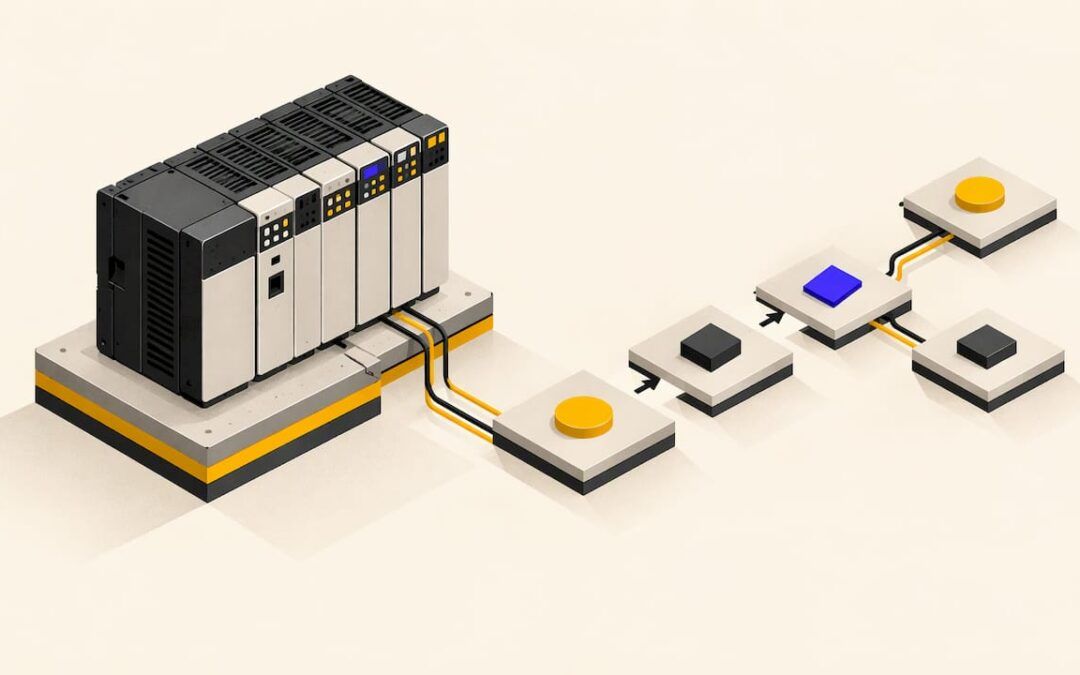
The ControlLogix system is modular. According to Rockwell’s ControlLogix System Selection Guide, a simple system consists of a standalone controller and I/O modules in one chassis. Larger systems add network modules and remote chassis, but the idea stays the same: the controller reads inputs through modules, solves the logic, and writes outputs through modules.
Before you open the software, be able to answer these questions about any rack you walk up to:
- Which slot holds the controller, and what are the key switch position and status lights telling you?
- Which modules are digital inputs, digital outputs, analog and communications?
- Where does each module’s wiring go, and how does it map to the electrical prints?
- Which network modules connect this chassis to drives, HMIs and other controllers?
Our walkthrough of an RSLogix 5000 rack shows how a physical chassis appears in the software, which is the connection most beginners struggle with.
Learn Studio 5000 Logix Designer
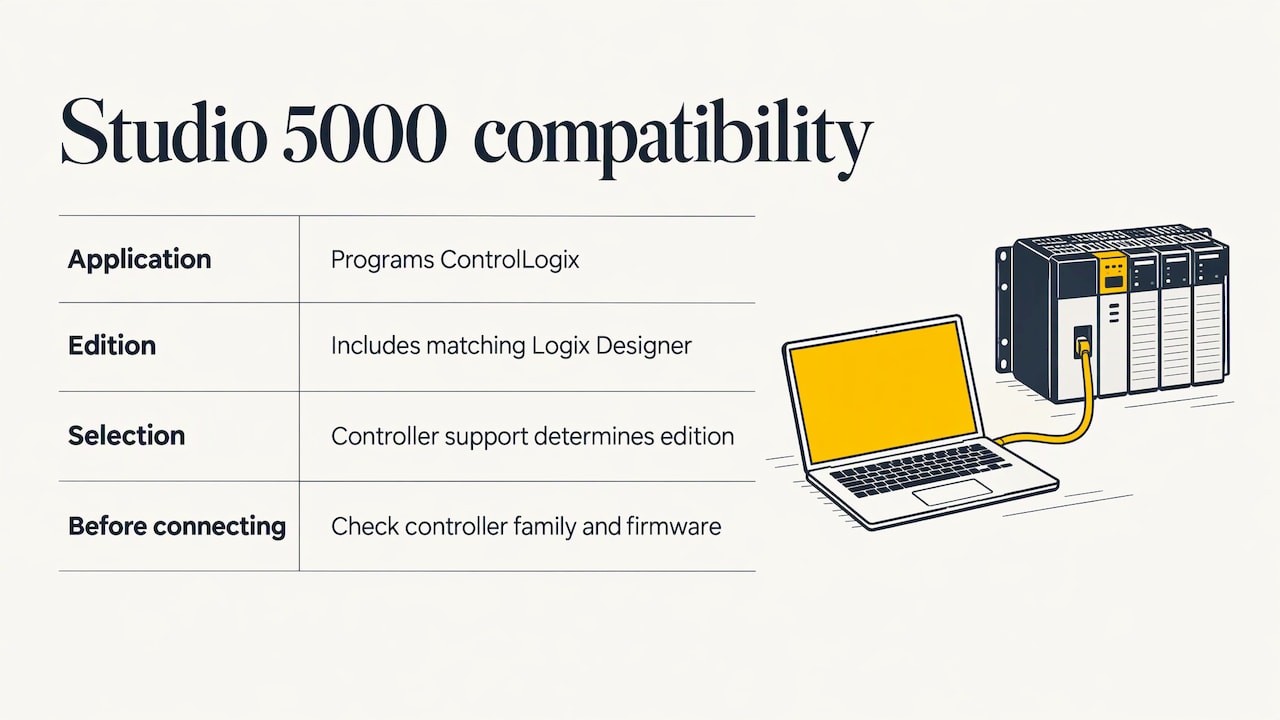
Studio 5000 Logix Designer is the application you use to program ControlLogix. The edition you need follows from the controller. Rockwell’s Studio 5000 Design Software Ordering Guide states that each Studio 5000 edition includes the matching edition of Logix Designer, and that controller support determines which Logix Designer edition you need. The same guide lists that the Professional, Full, Standard NetWorx, Standard and Service editions support the CompactLogix, Compact GuardLogix, ControlLogix and GuardLogix platforms, while all editions support CompactLogix and Compact GuardLogix.
In plain terms: check the controller family and firmware revision on the machine first, then match the software version to it. Many old “it won’t connect” problems start there.
The controller organizer
The first screen you will live in is the project tree. It holds the controller tags, tasks, programs and routines, plus the I/O configuration. If you understand how these nest, you can find any rung in any project. Our page on the Studio 5000 Controller Organizer walks through each folder and what belongs in it.
Tags instead of addresses
ControlLogix uses named tags. A tag like Conveyor_Run describes what it does, and the data type tells the controller how much memory it takes. Learn to build tags early, including descriptions, because a project with good names can be read by the next person on the night shift.
Master the scan cycle before anything else
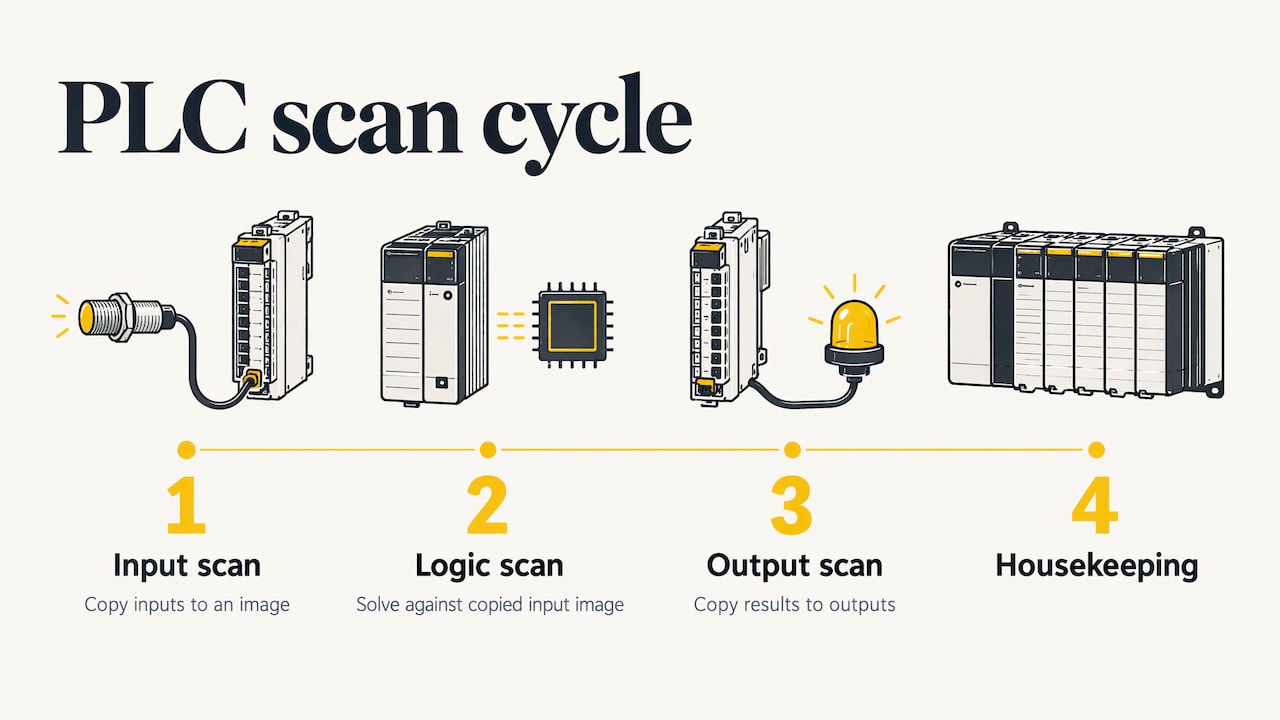
Every technician who troubleshoots a PLC well has the scan cycle in their head. Industrial Monitor Direct’s maintenance technician training guide describes it as four ordered steps: input scan, logic scan, output scan and housekeeping. Its advice is to drill them until you can recite them backwards.
The reason is practical. The controller does not react to an input the instant it changes. It copies inputs into an image, solves the logic against that image, then copies results to the outputs. When a rung looks correct but the output does not behave, the answer is often in that order of operations.
The same guide’s companion on PLC technician skills names a common pitfall: confusing ladder logic with an electrical schematic. A schematic shows current through wires. A ladder rung is a question the controller answers about bits in memory. Keep that distinction in every review and you avoid hours of confusion.
We cover the topic, including how to measure scan time, in PLC scan cycle: how it works.
Build ladder logic skills with machine-shaped exercises
Reading about instructions does not teach you to program. Building small logic that behaves like a real machine does. The skills worth practicing, in order:
- Start/stop seal-in: a motor that starts from a momentary button and stops from a normally closed stop. Learn why the stop is wired the way it is.
- Timers: delay on a conveyor start, or a minimum run time before a stop is allowed.
- Counters: count boxes past a sensor and trigger a divert at a set number.
- Sequencing: step through a simple process with state bits, so only one step is active at a time.
- Alarms: latch a fault, show it on a screen and require a reset.
Two of our tutorials follow this approach. The Studio 5000 simple PLC logic example builds your first working rungs, and the box sorting conveyor exercise puts counters, sensors and outputs together in a scenario that resembles a packaging line. When you want to see how individual instructions behave, RSLogix 5000 instructions in use shows them working.
Once the basics are comfortable, motion is the natural next skill for many engineers. Our RSLogix 5000 servo controls training and the MSF instruction in use page show how axes are commanded from a Logix controller.
Set up a practice environment
You need three things: a computer, the software and something to run logic against.
- Computer: Studio 5000 Logix Designer runs on Windows. Rockwell publishes processor, memory, disk and operating system requirements for each version in its release notes and compatibility pages, and they change with each major version, so read the notes for the version you will install before you buy or build a machine.
- Software: Install the Logix Designer version that matches the controllers you will support, as covered above.
- Something to control: Real hardware is ideal. If you do not have it, build exercises in the project with simulated inputs by using tags in place of physical sensors, and practice going through the same steps you would on a machine: configure the I/O, write logic, download, watch it run.
Treat each exercise as a small project. Name tags properly, comment the rungs, save a version before every change, and write down what you expected before you test. That habit is what separates someone who completed a course from someone who can be trusted with a production controller.
A troubleshooting routine for maintenance technicians
For maintenance staff, ControlLogix training pays off when a line is down and someone is waiting. The goal is a short, repeatable routine. The maintenance training guide cited above frames it as four questions a technician should be able to answer in under five minutes while the line is stopped:
- Is the field device doing what the print says?
- Is the right input bit on in the PLC?
- Is the rung that drives the output bit solving true?
- Is the output module actually energizing the field wiring?
This works because it follows the signal from the machine into the controller and back out again. It also stops you from changing logic when the problem is a sensor.
The statistics support the habit. The technician skills guide states that 80% of machine faults are field device failures, 15% are wiring and 5% are the PLC itself, and advises always proving the field side before suspecting the program. Treat those as one company’s figures rather than a universal law, but they match what most plant technicians learn: start at the sensor, not the code.
Safe habits when you go online
- Forcing outputs: the same guide recommends forcing only as a last resort and only with a witness. Notify the operator and shift supervisor, confirm the machine cannot injure anyone in the forced state, record the force in the shift log, and remove it before you leave the cell.
- OK versus Apply: in Studio 5000, pressing OK or Apply writes the change, while Cancel or Esc discards it. Treat those buttons as deliberate actions, not defaults, so you do not corrupt a project or force an output by accident.
- Upload first: the legacy audit checklist from the same publisher describes the first upload from a controller as the most important one, because it is the only guaranteed moment when the running state, including field changes never saved to a development file, exists in a known-good copy. Back up before you touch anything. See the audit checklist for the full reasoning.
A learning path by role
| Role | Learn first | Then | Practice with |
|---|---|---|---|
| Maintenance technician | Hardware identification, scan cycle, going online safely | Reading ladder, I/O status, fault recovery | Diagnosing a stopped conveyor from print to output |
| Controls engineer | Project organization, tags, data types | Structured logic, communications, motion | Building a sequenced machine from a written description |
| Student | Ladder basics, timers, counters | Tags, simulation, project documentation | Box sorting and start/stop exercises |
| Team lead or company | Common standards and naming | Cross-training so every shift has a diagnostician | Shared exercises scored against a checklist |
How long does it take?
There is no single number, because it depends on what you already know. Someone with an electrical background and a working knowledge of control circuits typically gets to basic competence faster than someone starting from zero, since the field-side knowledge is already there. A sensible target for the first stage is to be able to open a project, go online, find a given output’s rung and explain why it is on or off. The second stage is writing and changing logic with a documented backup. The third is diagnosing communication and motion problems.
That is why we recommend short, repeated practice over occasional long sessions. Logic skills fade without use, and a small exercise each week keeps the scan cycle and the tag model fresh.
Why we built our training this way
Most ControlLogix learners do not fail because the instructions are hard. They fail because nobody showed them how the pieces connect: the rack on the wall, the tag in the project, the rung on the screen and the sensor on the machine.
That is why our training is built on real-life examples and practical strategies. Our content is for all skill levels, it is designed to be cost-effective, and we keep it current with industry-standard software such as RSLogix 500, RSLogix 5000, Studio 5000 and FactoryTalk View Studio.
A technician needs a routine they can run at 2 a.m. An engineer needs a way to structure a project so others can read it. A student needs exercises that look like the job. Video tutorials let you pause and repeat, and coaching lets you bring your own project and your own questions to someone who has done the work.
When you can see the whole signal path, from field device to input image to rung to output, the platform stops being intimidating. That confidence is what we aim to give every student.
the author
Where to go next
If you want a structured path, start with our Allen Bradley PLC training, which includes courses for Allen-Bradley programming, FactoryTalk View ME, the PowerFlex 525 and servo motion. Prices for individual courses are listed on the course pages.
If you have a specific project or fault in front of you, the 90-minute PLC coaching session is $97 per session, and online PLC coaching starts from $67 per session. For ongoing learning, the Yearly PLC Training Membership is $192 per year, and details are on our programming services and membership page. Companies that want logic written for them can use our PLC programming services at $140 per hour, or the 10-hour and 20-hour project packages at $1,400 and $2,800.
Beginners who want a gentle introduction first can read Allen Bradley PLC controls for beginners, then move into the courses when the vocabulary feels familiar.
FAQ
What software is used to program ControlLogix?
ControlLogix controllers are programmed in Studio 5000 Logix Designer, the current name for what many people still call RSLogix 5000. Rockwell’s ordering guide states that the edition you need depends on the controller family you support.
Do I need ladder logic experience before ControlLogix training?
No. Good training starts from the scan cycle and the project organizer, then builds to ladder logic. An electrical or controls background helps, because you already understand the field devices the logic is controlling.
Which course is best for PLC beginners on Allen-Bradley?
Pick the one that starts with the platform you will actually work on and includes hands-on exercises. For ControlLogix and Studio 5000, that means a path covering hardware, tags, ladder logic and troubleshooting, such as our Allen Bradley PLC training.
How do I troubleshoot a ControlLogix fault quickly?
Work from the machine toward the controller: check the field device, then the input bit, then the rung driving the output, then the output module. Back up the project before making changes, and force outputs only with a witness and with the machine in a safe state.
Can a company train several people at once?
Yes. Companies use our courses and coaching to give each shift a person who can diagnose a controller. Contact us through our site to discuss your team’s needs.
Sources
- ControlLogix System Selection Guide
- Studio 5000 Design Software Ordering Guide
- PLC Maintenance Tech Training Guide
- PLC Technician Career Path: Skills and Competencies Guide
- Legacy PLC Audit Checklist