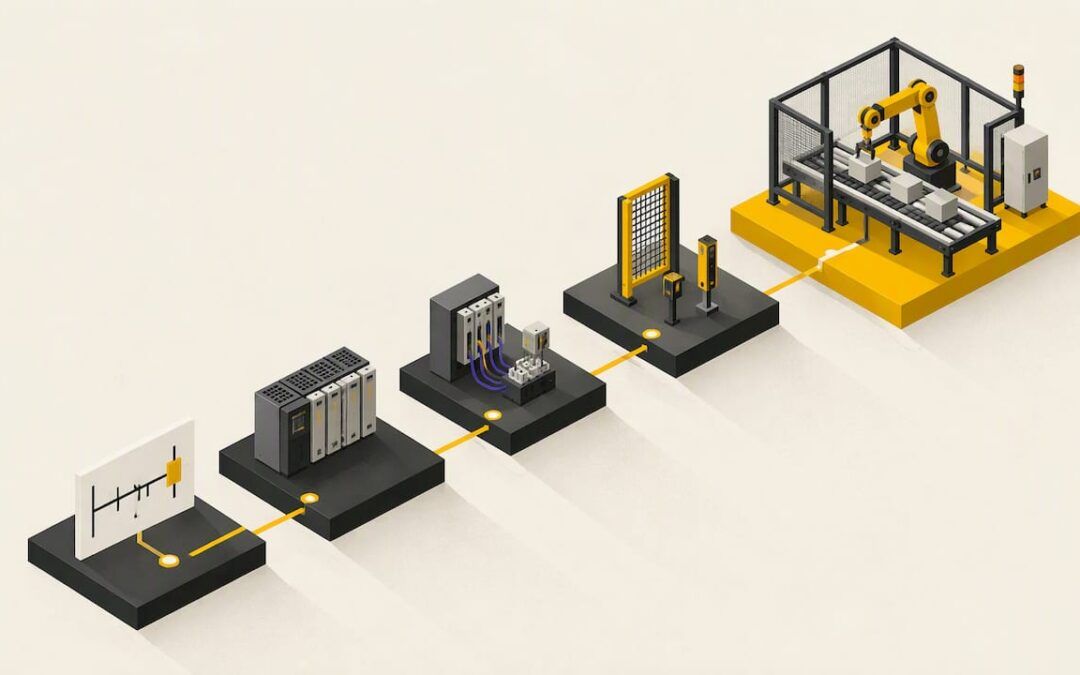
The best PLC programming projects are small machines you can describe in one paragraph: a traffic light, a parking-lot counter, a conveyor, a garage door. Start with timers and sequencing, add interlocks and sensors, then move to multi-state logic like a lift or a washing machine. Build each one in a simulator first, write down what should happen, and only then wire real hardware.
Below are nine projects in a sensible order, what each one teaches, a repeatable method for building any of them, and how to practice if you have no equipment at all.
TL;DR
- Begin with a traffic light. One small program covers inputs, outputs, timers and sequencing.
- Progress in this order: counter, motor start/stop, conveyor, garage door, hot-water heater, lift, washing machine.
- For every project, write the behavior in plain words, list inputs and outputs, then test startup, normal run, stop and reset.
- A simulator is enough to learn on. Move to supervised, low-voltage hardware only after the logic passes your test list.
- Treat lockout/tagout as part of the project once real machines are involved.
Table of Contents
- What makes a good PLC practice project
- Nine PLC projects, in the order to build them
- How to build any PLC project, step by step
- No hardware? Practice with a simulator
- Projects for troubleshooting practice
- Safety before you touch real equipment
- Our perspective: projects beat theory, as long as someone checks your work
- Where to go next
- FAQ
- Sources
What makes a good PLC practice project
A good project has a clear start, a clear end and a few ways to go wrong. That last part matters. A project where nothing can fail teaches you to type rungs, not to think like a controls engineer.
Look for four traits:
- A physical story. “Cars arrive, lights change, a pedestrian presses a button” is easier to program than “turn output 3 on after input 7.”
- At least one timer or counter. These are the instructions you will use on every job.
- A fault or interlock. A stuck sensor, a door that never closes, a motor that must not run while a guard is open.
- A test you can repeat. If you cannot say what the right answer looks like, you cannot tell whether the program works.
The skills also go beyond ladder logic. A technical college PLC course, for example, pairs its labs (a pneumatic overpressure alarm, a hot-water heater, typical motor control) with print reading, wiring, and troubleshooting with test equipment. Pick projects that make you touch all of those over time, not only the programming screen.
If you have never seen a rung, read our PLC ladder logic basics for beginners first. It takes less time than debugging a project you do not yet have the vocabulary for.
Nine PLC projects, in the order to build them
| # | Project | Main skills | Difficulty |
|---|---|---|---|
| 1 | Start/stop motor with seal-in | Contacts, coils, latching, stop logic | Beginner |
| 2 | Traffic light | TON timers, sequencing, pedestrian interrupt | Beginner |
| 3 | Parking-lot counter | Up/down counters, comparison, full/empty outputs | Beginner |
| 4 | Timed lighting | Timers, runtime, comparison | Beginner |
| 5 | Conveyor with interlocks | Motor control, safety interlocks, sensors | Beginner to intermediate |
| 6 | Garage door | Limit switches, proximity sensors, interlocks | Intermediate |
| 7 | Hot-water heater or tank | Analog or setpoint logic, alarms | Intermediate |
| 8 | Three-storey lift | State memory, call registration | Advanced |
| 9 | Washing machine | Full process sequencing, timeouts | Advanced |
1. Start/stop motor with seal-in
Every PLC programmer builds this one. A start button energizes a motor output, a contact from that same output holds it on, and a stop button breaks the circuit. It is tiny, and it teaches the single most important pattern in ladder logic.
The lesson most beginners miss: wire and program the stop as a normally closed device, so a broken wire stops the motor instead of leaving it running. Our easy beginners PLC ladder logic example walks through this kind of circuit rung by rung.
2. Traffic light
The traffic light is the standard first sequence for good reason. One small system exposes input reading, output control, TON timing, sequencing and pedestrian-interrupt handling before you move on to counting and HMI work.
Build it in three passes:
- Two-way light with fixed green, yellow and red times.
- Add a pedestrian button that requests a crossing at the end of the current phase.
- Add a fault mode: flashing red if a “controller OK” input drops.
We have a full Allen-Bradley PLC traffic light exercise as a video tutorial if you want to compare your solution with a worked one.
3. Parking-lot counter
One sensor at the entrance, one at the exit, and a counter that goes up and down. When the count reaches capacity, a FULL light turns on and the entry gate stays closed. This is the project for counter-heavy logic.
The interesting problems appear fast. What happens if the count would go below zero? What if two cars trigger the sensors at nearly the same moment? Decide the rule, write it down, test it.
4. Timed lighting
Lights that turn on for a set period after a button press, or run on a schedule, teach timers, runtime accumulation and comparison instructions. The same source describes this build as practice for timers, runtime, comparison and energy monitoring. It is a good project to finish in an evening.
5. Conveyor with interlocks
A conveyor is where motor control meets safety interlocks. Start with one belt, a start/stop station and a jam sensor. Then add a second conveyor that cannot run unless the first is running, and a disable for each.
Extensions worth building:
- A reversing option with a delay and a lockout so forward and reverse can never be on together.
- A sorting gate driven by a part-present sensor.
- A stop-delay so the belt clears before shutting down.
6. Garage door
This project adds limit switches, proximity sensors and logic that depends on position. The door must stop at fully open and fully closed, reverse if an obstruction sensor trips, and not move if a command arrives while it is already travelling. A progression from traffic lights to a garage door moves you from timers and sequencing to interlocks and proximity sensors.
7. Hot-water heater or tank level
Now add a process variable. A heater turns on below a low temperature setpoint, turns off at a high one, and raises an alarm if the temperature never rises within a set time. Use a deadband so the output does not chatter. This is the first project where you will think about scaling an analog input into engineering units.
8. Three-storey lift
A lift needs memory. It has to know the current floor, remember which calls were registered, choose a direction and clear each call once served. The same progression places the lift at the stage of multi-floor state and call-registration logic.
Build it as a state machine, with one clear state at a time (idle, moving up, moving down, door open). Resist the urge to write a separate pile of rungs per floor.
9. Washing machine
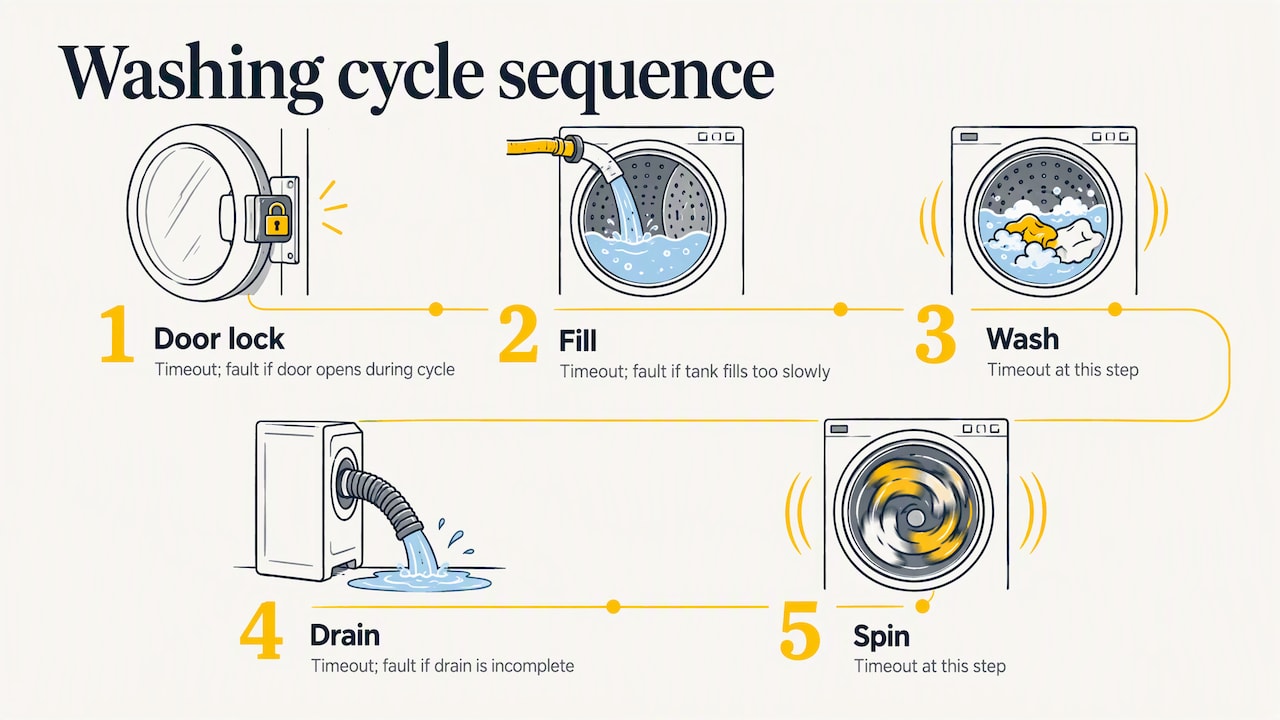
The washer is complete process sequencing: door lock, fill, wash, drain, spin, with timeouts at each step. Add a fault if the door opens during a cycle, if the tank does not fill in time, or if it does not drain. That fault handling is what separates a classroom exercise from something that resembles industrial code.
How to build any PLC project, step by step
The method matters more than the project. This sequence works for all nine.
- State the behavior in plain language. Two or three sentences, no instruction names.
- List the inputs and outputs, including each device’s normal, unpowered state. A stop button that is normally closed behaves very differently from one that is normally open.
- Build one small rung and check it before building the next. This approach of simulating or forcing each input as you go catches mistakes early.
- Write expected results. Make a table with startup, normal operation, stop, reset and simultaneous conditions.
- Run the tests in simulation, then compare actual outputs against your table.
- Move to supervised low-voltage hardware only when every row passes.
Simulation is verification, not just compiling. A program can compile cleanly and still behave wrongly, which is why the expected-results matrix is worth the ten minutes it takes.
Here is a sample test table for the pedestrian crossing in project 2:
| Condition | Input state | Expected result |
|---|---|---|
| Startup | Power on, no button | Main road green, pedestrian red |
| Normal cycle | No button | Phases repeat at set times |
| Pedestrian request | Button pressed during main green | Request held, crossing granted after current phase |
| Stop | Stop input on | All outputs off or flashing red, per your rule |
| Reset | Reset after stop | Returns to startup state |
| Simultaneous | Button pressed and stop active | Stop wins |
For the program structure itself, our guide to ladder logic for beginners in Studio 5000 shows how to organize tags and routines so a project stays readable as it grows.
No hardware? Practice with a simulator
You do not need a trainer or a cabinet to start. A simulator or emulator gives you virtual inputs, outputs and memory. The CODESYS demo and AutomationDirect’s built-in simulator are two options named in a beginner guide to PLC simulation, and the method is the same: toggle or force inputs, then compare outputs with your written expectations.
A few habits make simulation more useful:
- Force inputs in awkward orders, not just the happy path.
- Hold an input on for a long time to catch missing one-shot logic.
- Test power-up in the middle of a cycle, if your platform supports it.
- Save a copy before each major change so you can roll back.
If you work with Allen-Bradley software at work or want to, choose a project and build it in the platform you will use on the job. The logic transfers between brands, but the tag handling, addressing and troubleshooting tools do not.
Projects for troubleshooting practice
Maintenance technicians often need to read and fix programs more than write them. Use the same projects, with a twist: have a colleague (or your future self) break something, then find it.
Good faults to introduce:
- A limit switch that never changes state.
- A normally closed stop wired as normally open.
- A timer preset typed in the wrong units.
- An output address used by two coils.
- A sensor that chatters near its threshold.
The technical college course mentioned earlier trains this in a structured way, with schematics, P&IDs and test equipment used to isolate problems step by step. Follow the same order: confirm the symptom, check the program’s live status, then check field devices and wiring.
Our guide to reading PLC ladder logic covers the first half of that process: following a rung back from the output that is not turning on to the condition that is blocking it.
Safety before you touch real equipment
A project on a bench trainer at low voltage is one thing. A project that connects to a machine is another.
In the United States, employers generally must comply with 29 C.F.R. §1910.147 for servicing and maintenance of machines where unexpected energization or release of stored energy could injure workers. OSHA has also stated that an e-stop counts as an energy-isolation device only if it physically disconnects the electrical conductors and mechanically controls pneumatic energy. A stop button in your ladder logic does not isolate energy. Neither does a program that says the output is off.
Practical rules:
- Never rely on a software stop to make a machine safe to work on.
- Use the site’s written energy-control procedure, which must account for all hazardous energy sources unless an exception applies.
- Keep first hardware tests supervised and at low voltage.
- Ask your safety lead or a qualified controls engineer before you modify a program on a live machine.
Our perspective: projects beat theory, as long as someone checks your work
We built our training around real-life examples because that is how controls skills form. People rarely struggle because they cannot learn what a normally open contact is. They struggle because nobody showed them how a conveyor, a timer and a safety input fit together on one machine.
Our view, in short:
- Start smaller than you think. A traffic light done properly, with test cases, teaches more than a lift copied from a video.
- Write the test before the rung. The habit separates technicians who can commission a machine from those who can only edit one.
- Match the platform to the job. If your plant runs Allen-Bradley, practice in Studio 5000 or RSLogix, and use FactoryTalk View when you add an HMI screen.
- Get feedback. A project nobody reviews can carry a bad habit for years.
That last point is why we offer coaching alongside the courses: someone looks at your actual program and tells you what a senior programmer would change.
— the author
Where to go next
If you want a guided path instead of assembling projects on your own, our ladder logic training for beginners in Studio 5000 is the place to start. It covers the instructions and program structure the projects above depend on.
When you have a project you want reviewed, or a program that will not behave, we offer a 90-minute PLC coaching session for $97 per session, plus a yearly PLC training membership at $192 per year. Browse the full range of courses on Online PLC Support and pick the one that fits your platform.
FAQ
What is a good first PLC project for a beginner?
A traffic light. It covers inputs, outputs, TON timers, sequencing and a pedestrian interrupt in a small program. Once it works, add a fault mode and a test table before moving on to a counter or a conveyor.
Can I do PLC projects without a physical PLC?
Yes. Use a simulator or emulator with virtual inputs and outputs, force each input, and compare the results with expected behavior you wrote down first. Move to supervised, low-voltage hardware only after the logic passes every test.
Which ladder logic projects teach troubleshooting?
Conveyors with interlocks, motor control with a reversing circuit, and tank or heater alarms are good choices. Introduce a deliberate fault, such as a dead limit switch or a miswired stop, then find it using live program status and a meter.
How many projects should I build before applying for a controls job?
There is no official number. Three to five documented projects, each with a behavior description, I/O list, program and test results, show a hiring manager more than a long list of unfinished ones. Include at least one with fault handling.
Are PLC projects safe to run on real machinery?
Only under your site’s safety procedures. Lockout/tagout under OSHA’s 1910.147 standard applies to servicing and maintenance, and software stops do not isolate energy. Ask your safety lead or a qualified controls engineer before you connect a new program to a live machine.
Sources
- PLC Training Labs: Traffic Light, Garage, Lift, Washer
- PLC Beginner Project Design: Three Training Builds
- PLC Programming Roadmap for Beginners
- PLC Programming Basics: A Beginner’s Guide
- Programmable Logic Controllers 1, course listing
- OSHA standard interpretation on lockout/tagout, 21 June 2002