A good automation programming course teaches you to write, download, debug and troubleshoot PLC logic (usually ladder logic first) on real industrial software, with hands-on exercises rather than slides alone. Pick the course that starts at your current level, uses the platform your plant runs, and ends with you building and fixing programs yourself. This guide shows what to look for, what to expect to learn, how to match a course to your experience, and what certifications cost.
TL;DR
- Look for a course built around ladder logic, I/O configuration, HMI basics and troubleshooting, not theory alone.
- Match the software to your job: Allen-Bradley platforms such as RSLogix 500 and Studio 5000 are what many US plants run.
- Choose your starting level honestly. Beginners need fundamentals; working techs benefit from troubleshooting and project-design material.
- Certifications like ISA’s CAP and CCST are separate from courses and carry their own exam fees and experience rules.
- Free material is a good way to start, but structured practice with feedback is what turns knowledge into job skills.
Table of Contents
- What an automation programming course actually teaches
- The skills a good course should give you
- Software and hands-on practice to look for
- Free versus paid: where each fits
- How to pick a course that fits your level
- Certifications: what they cost and require
- Our perspective
- Where our training fits
- A simple plan for your first 90 days
- FAQ
- Sources
What an automation programming course actually teaches
“Automation programming” is a broad phrase. In industrial settings it almost always means programming programmable logic controllers (PLCs), the rugged computers that run machines, conveyors, pumps and production lines, plus the human-machine interfaces (HMIs) operators use to see and control them. A few results you will see online are about software robots (RPA) instead. That is a different field, so check the course description before you pay.
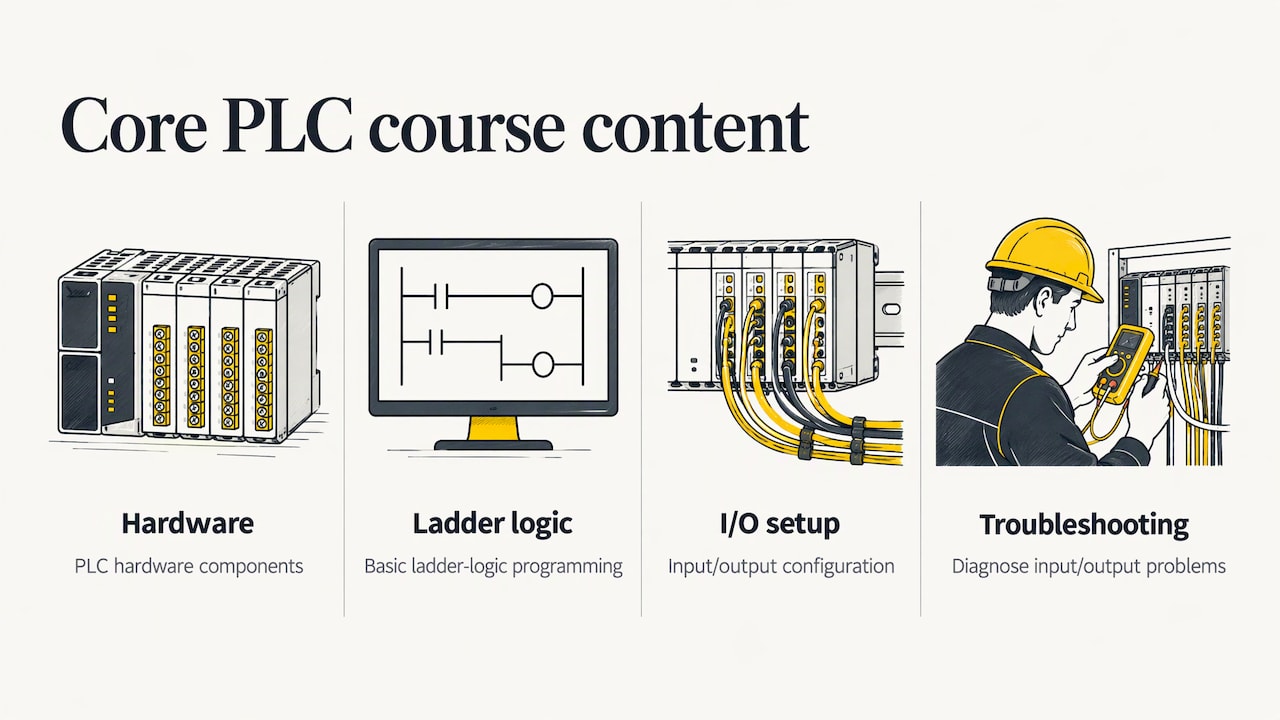
Colleges give a clear picture of the core content. Allegheny College’s PLC 1 Fundamentals course covers PLC hardware components, basic programming with ladder logic, input/output configuration and troubleshooting, with hands-on exercises in designing, programming and testing simple control systems. A community college introduction to PLCs lists connecting inputs and outputs, writing, downloading and debugging ladder programs, and using timers, counters, latches, bits and math operations to automate manufacturing processes.
That is the baseline. If a course description does not mention most of those items, it is probably not a programming course in the sense an employer means.
Who these courses are for
The audience is wider than most people expect:
- Students and career changers who want a first marketable skill.
- Maintenance technicians and electricians who need to read a program and find a fault at 2 a.m.
- Engineers from other disciplines who inherit controls work. ASME’s Industrial Automation with Robotics learning path, for example, targets engineers without formal robotics training and working engineers in small to mid-size manufacturers.
- Managers and companies that want a team to share the same skills and vocabulary.
By trade, the emphasis shifts. Mechanics, operators and engineers each use PLC programs differently, and the best courses say which of those people they are written for.
The skills a good course should give you
Course titles are cheap. Skills are what matter. Wake Tech’s PLC troubleshooting course is a useful checklist of practical outcomes: starting and shutting down PLC systems, configuring Ethernet/IP and USB serial communications, transferring programs between PLCs and PCs, designing ladder logic, programming motor-control sequences, using math and comparison logic, configuring HMIs, and troubleshooting power distribution, processor faults and multi-step sequences.
Orange Coast College’s Industrial PLC Technician certificate adds another layer: connecting to PLCs, diagnosing system problems, backing up and restoring programs, reading and creating schematics, and working with HMIs, SCADA and industrial communication protocols, while preparing students to work safely under NFPA 70E.
Turn those lists into a quick test for any course you are considering:
| Skill | What it looks like in a course |
|---|---|
| Ladder logic | Building start/stop circuits, timers, counters and latches from scratch |
| I/O and tags | Addressing real inputs and outputs, naming tags, reading wiring and schematics |
| Communications | Going online with a processor, Ethernet/IP setup, transferring programs |
| HMI | Building screens, alarms and buttons that talk to the PLC |
| Troubleshooting | Finding a faulty rung, a bad input or a processor fault from live data |
| Backup and restore | Saving, comparing and recovering a working program |
If you want to see what practical ladder work looks like before committing, our ladder logic tutorial for beginners and the traffic light exercise video walk through complete examples.
Software and hands-on practice to look for
A course that never puts you in front of an actual programming environment will not prepare you for a plant. In the US, many facilities run Allen-Bradley (Rockwell Automation) controllers, so software such as RSLogix 500, RSLogix 5000 and Studio 5000 is a common target. For operator screens, FactoryTalk View is the usual companion. If your employer runs Siemens, Mitsubishi or another brand, ask which platform the course uses, since menus, addressing and instruction sets differ even when the logic concepts carry over.
Three things separate strong practice from weak practice:
- Real software, real workflow. You should create projects, download them, go online and debug. Emulation is a legitimate way to practice without hardware; Rockwell’s Logix Emulate runs virtual controllers on a PC and needs a matching license.
- Exercises that mimic machines. Motor starters, traffic lights, conveyors, tank levels and sequences teach you more than isolated instruction demos.
- Fault finding, not just building. Troubleshooting is where maintenance careers are made, so a course should have you find faults in programs someone else wrote.
Safety belongs in the lab
Troubleshooting means working near energized equipment, and a serious course treats electrical safety as part of the skill set, not an afterthought. Before you open a panel or touch a machine you are diagnosing, follow your site’s lockout/tagout procedure. This step-by-step lockout tagout checklist is a practical reference for how the process is organized, and the requirements themselves come from OSHA and your employer’s written program.
Free versus paid: where each fits
Free courses are a fine first step. Videos and simulators let you see ladder logic, learn what a rung is and decide whether you like the work. Many of the top-ranking pages for this topic are free overviews of automation concepts, and ISA also publishes self-paced modular training, including a SCADA systems integration course.
Where free material usually runs out:
- It rarely follows a sequence from first rung to a finished project.
- It seldom comes with a way to ask questions about your own program.
- It often does not cover the exact platform your plant uses.
Paid courses earn their price when they supply structure, current software, and someone to answer you. The right question is not “free or paid?” but “what is the cheapest route that gets me to the skill I need?” For some people that is a free video series plus a coaching session on the sticking point.
How to pick a course that fits your level
Harvard’s Division of Continuing Education recommends starting with your professional goals, then weighing the time you have, employer sponsorship and online versus in-person format, and finally reading the course description to confirm it covers the skills you need. ISA’s Skills Development Resource Navigator works the same way: you choose your job role and skill, enter current and target levels, and it suggests resources.
Apply that to PLC learning in three steps.
- Name the outcome. “Pass a technical interview,” “fix our packaging line faults,” and “program a new machine” are three different goals with three different courses.
- Place yourself honestly. If you have never opened a PLC project, start with fundamentals. If you navigate a project daily but avoid writing new code, look for design and troubleshooting content. Skipping the basics usually costs more time than it saves.
- Check the match. Read the syllabus against the skills table above. Count how many hands-on items it names.
A quick guide by starting point
| You are | Start with | Then |
|---|---|---|
| New to PLCs | Ladder logic fundamentals on one platform | Basic troubleshooting exercises |
| Maintenance tech | Troubleshooting and online debugging | HMI and drives |
| Engineer new to controls | Platform basics, then project structure | Motion, networking, standards |
| Team lead or company | A shared fundamentals track | Role-specific advanced topics |
If you work with Allen-Bradley equipment, our Allen Bradley PLC guide for beginners is a gentle starting point, and our SCADA training course guide helps when your next step is supervisory systems.
Certifications: what they cost and require
A course teaches skills; a certification verifies them. They are different purchases, and it helps to know the numbers before you plan.
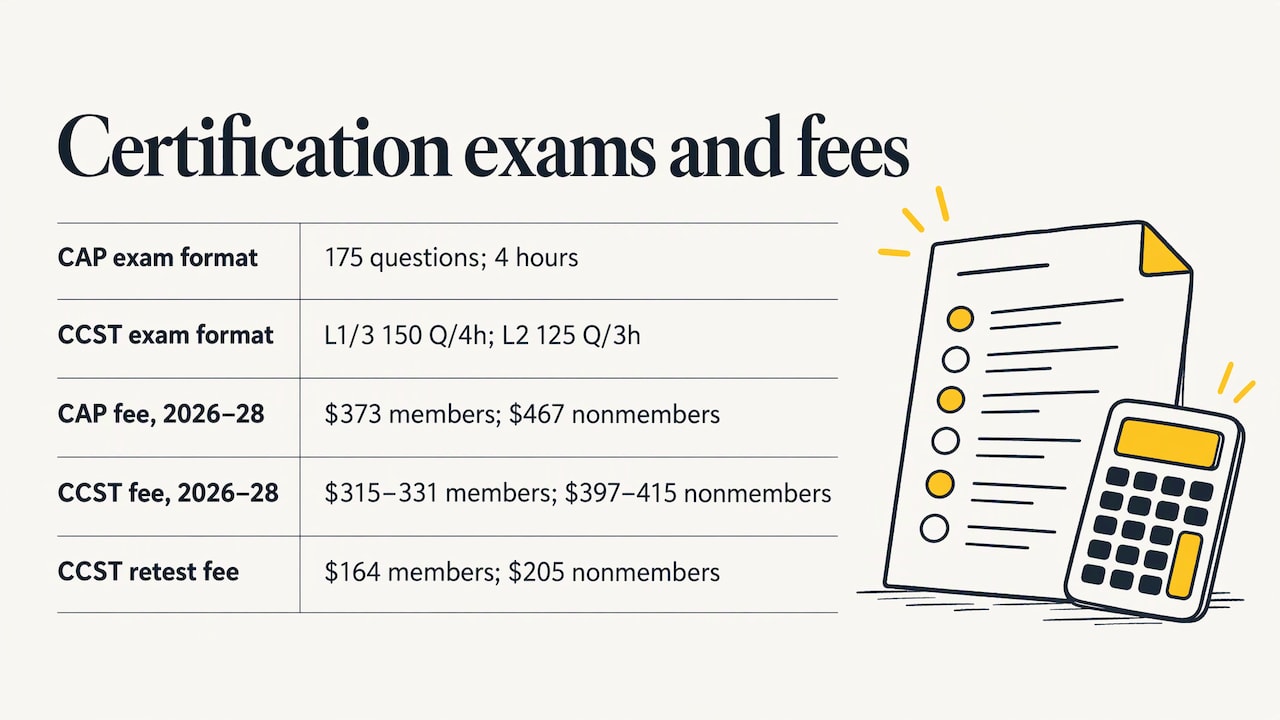
The International Society of Automation lists two main exams. According to ISA’s certification FAQ, the Certified Automation Professional (CAP) exam has 175 questions in 4 hours and costs $373 for members and $467 for non-members. The Certified Control Systems Technician (CCST) exam has three levels: Levels 1 and 3 have 150 questions in 4 hours, and Level 2 has 125 questions in 3 hours. CCST exam fees run from $315 to $331 for members and $397 to $415 for non-members, and a retest costs $164 for members or $205 for non-members. Those fees apply to ISA’s 2026 to 2028 schedule, so confirm current pricing before you register.
Eligibility matters too. CAP requires a four-year technical degree and at least 5 years of automation experience, or a two-year degree or no degree with at least 10 years. Applicants without a four-year degree must also document at least 2 years in a position of responsible charge.
ISA’s review courses are priced separately from the exam in one case: the CCST review courses at Levels 1, 2 and 3 include the exam fee and give a 12-month eligibility period, while the CAP exam fee is not included with the CAP review course.
For most people entering the field, hands-on skill comes first, and a certification follows once you have the experience it asks for. Employers often care more about whether you can fix a stopped line than which badge you hold.
Our perspective
Most people who write to us are not short on motivation. They are short on a clear path. They have watched scattered videos, opened a project, and frozen at the first fault because nobody showed them how a real program is organized.
We build our training around real-life examples and practical strategies, in industry-standard software such as RSLogix 500, RSLogix 5000, Studio 5000 and FactoryTalk View Studio. The aim is cost-effective, structured content that suits all skill levels, so a student and a seasoned technician can each find the right entry point.
We believe the fastest way to learn is to build, break and fix. That is why our material pairs tutorials and video support with exercises that look like the machines you will meet at work, and why we keep updating it as the tools change.
When a learner needs more than a course, coaching closes the gap. Bringing your own program or your own plant problem to a session is often what turns knowledge into confidence.
the author
Where our training fits
If you want a structured route, our PLC training courses cover Allen-Bradley PLC training, FactoryTalk View ME, the PowerFlex 525 drive, and servo motion courses for learners who want to go further. Pricing is published on the individual pages where available.
For ongoing learning, the Yearly PLC Training Membership is $192 per year. If you would rather work through your own questions, a 90-minute PLC coaching session is $97 per session, and online PLC coaching starts from $67 per session. Companies that need programming done rather than taught can look at our PLC programming services at $140 per hour, or project blocks at $1400 (10 hours) and $2800 (20 hours). Not sure where to begin? Start at our PLC training overview.
A simple plan for your first 90 days
Courses work best with a rhythm. Here is a realistic outline for someone starting from zero while holding a full-time job:
- Weeks 1 to 3: Learn the hardware and the software layout. Create a project, add a few inputs and outputs, and get a lamp to turn on with a button.
- Weeks 4 to 6: Build start/stop seal-in circuits, then add timers and counters. Rebuild each exercise a second time without looking at the lesson.
- Weeks 7 to 9: Add math and comparison logic, write a short sequence such as a traffic light, and connect it to a simple HMI screen.
- Weeks 10 to 12: Practice troubleshooting. Have a colleague or instructor break a program, then find the fault using online monitoring.
Thirty to forty-five minutes a day beats one long weekend session. Keep a notebook of every instruction you use and what it did, since that becomes your own reference later.
FAQ
What is the best PLC course for a beginner?
The best beginner course is the one that teaches ladder logic on the platform you are likely to use at work, with hands-on exercises and troubleshooting. Check that the syllabus covers I/O configuration, timers, counters and HMI basics. For Allen-Bradley learners, our beginner material starts from zero.
Are there free courses for automation certification?
Free material exists for learning concepts, and ISA offers some self-paced modular training. The certification exams themselves carry fees, such as $373 for CAP for members and $467 for non-members, and require documented experience. Free lessons help you prepare, but they do not replace the exam.
Is an automation programming course the same as RPA?
No. Industrial automation programming means PLCs, HMIs and control systems that run physical equipment. RPA automates software tasks on computers. Read the syllabus to see which one a course covers.
Do I need hardware to learn PLC programming?
Not at the start. Emulation software lets you run virtual controllers on a PC, though some platforms need a license. Hardware helps later, when you want to practice wiring, communications and real fault finding.
Sources
- PLC 1 Fundamentals, Allegheny College
- Introduction to PLCs course, community college catalog
- Industrial Automation with Robotics Learning Path, ASME
- MEC-3010M1 Introduction to PLCs and PLC Troubleshooting, Wake Tech
- Industrial PLC Technician Certificate, Orange Coast College
- RSLogix 5000 simulator options
- Lockout tagout procedures
- ISA self-paced modular training
- How To Choose a Professional Development Program, Harvard DCE
- ISA Skills Development Resource Navigator
- ISA Certification FAQ
- CAP General Requirements, ISA
- Certification Testing, ISA